
Sparkup Review 2026: Interactive Webinars, Pricing & Limits
My Sparkup review: the French interactive webinar platform. Features, real pricing from €60 per month, limits and how it compares to alternatives.

Written by Alexis Morain
Sponsored article: Sparkup commissioned this review from SaaS Radar. The analysis, the score and the reservations remain my own.
TL;DR
Sparkup is a French platform for webinars and corporate live events that bets everything on audience participation: polls, quizzes, word clouds, viewers on screen, one-click speaking. It is built for communications, HR, training and marketing teams who are tired of webinars where people silently watch slides. My score: 8/10, for interactivity above the pack, serious European compliance and a first paid tier at €60 per month. A free plan lets you test the format with no commitment.
My verdict at a glance
What I like
- ✅ Interactions displayed on the video itself: polls, quizzes with a podium, word clouds, raised hands
- ✅ The virtual audience, which puts participants in a grid around the speaker
- ✅ Unlimited user accounts and webinars on every plan
- ✅ Data hosted in France, GDPR, ISO 27001 and SAML SSO
- ✅ AI-translated live captions in more than 100 languages
What I'm watching
- ❌ No documented native CRM connector, you have to use the API
- ❌ Business and Enterprise plans on quote only
- ❌ Still very few public reviews on G2 and Capterra
Try Sparkup on your next live
The free plan hosts up to 20 participants, with unlimited webinars.
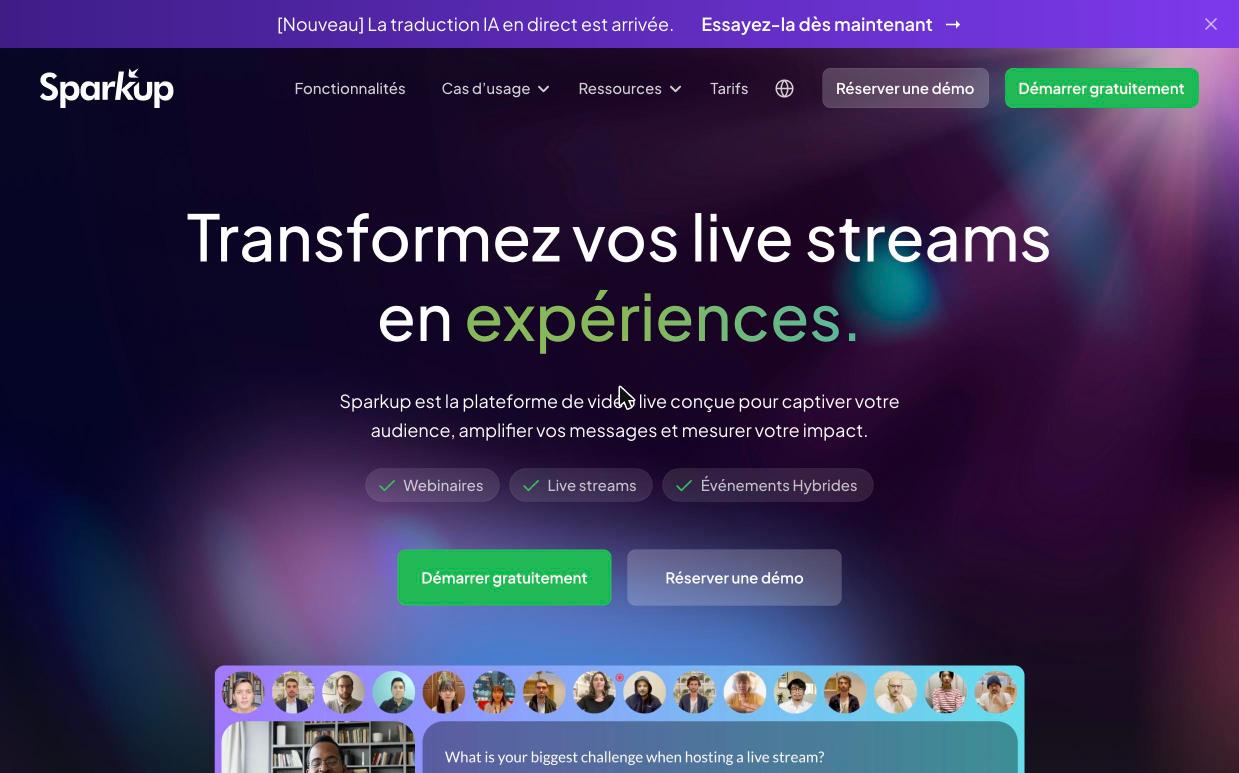 The Sparkup home page, which covers webinars, live streams and hybrid events.
What exactly is Sparkup?
Sparkup is a 100% browser-based live video platform built to get a webinar audience participating instead of just watching.
The company, based in Paris, started in 2017 on different ground: a web app that woke up conference rooms with polls and word clouds. That DNA shows everywhere in the current product. Where most webinar tools tuck the poll into a tab next to the video, Sparkup overlays votes, questions and reactions on the stream. Viewers see the room react, like on a TV set.
The product covers three formats. First, the classic webinar. Second, the corporate live event: all-hands, town hall, executive announcement. Third, the hybrid event, where the audience in the room and the one online vote in the same poll. The target is clear: internal communications, HR, training and marketing teams at mid-sized and large companies. The logos the company displays confirm it, from Saint-Gobain to Decathlon, including SNCF Voyageurs, Matmut and Crédit Mutuel.
To place Sparkup, you need to clear up two confusions. It is not a meeting tool like Zoom or Microsoft Teams. It is not a broadcast studio for creators like StreamYard either. It is an event tool, in the same family as Livestorm or WebinarGeek, with a deliberate focus on audience engagement.
What Sparkup really gets right
Sparkup stands out for interactions built into the picture, a visible audience and studio-level production without an external control room.
Interactions that appear on the live
Chat, Q&A, polls, quizzes with a leaderboard, custom emoji reactions, word clouds, satisfaction surveys: everything is included from the free plan. The difference is in the display. In active mode, interactions appear directly on the player. A speaker can also bring a participant on stage with one click: the viewer goes from streaming to video call without switching tools.
The virtual audience, the signature feature
Participants who choose to appear show up in a video grid around the speaker. The company even offers to project that grid on an LED wall in a studio, to recreate the energy of a full room. For a remote all-hands, the effect is clear: the speaker talks to faces, not to a count of connected viewers. Customizing it and AI-assisted moderation are reserved for the Business and Enterprise plans.
A full studio in the browser
Layouts, banners, backgrounds, logo, backstage with chat between speakers, slides and screen sharing: production happens inside Sparkup, with no software to install. For heavier productions, the Business and Enterprise plans accept an RTMP stream from an external control room, Zoom or Teams. On the delivery side, video is 1080p on paid plans, with the company claiming up to 4K, with sub-second latency. A peer-to-peer eCDN eases the load on the company network when hundreds of employees watch from the same site.
Live translation
This is the 2026 novelty: Sparkup generates live translated captions in more than 100 languages, with no interpreter and no extra audio channel. The company states that audio streams are never used to train AI models. For a group that brings its teams from France, Spain and Germany into the same town hall, this is the argument that justifies the Business plan.
Security, replay and analytics
Data is hosted in France, the platform is GDPR compliant, the company displays its ISO 27001 certification, and SAML v2 SSO works with Okta, Azure or OneLogin. After the live, Sparkup assembles the replay on its own and delivers analytics: watch time, retention, poll results, chat and question export. An enterprise IT department will find answers to its security questionnaire here.
See the virtual audience in action
The Sparkup team shows you the studio and the grid on your own use case.
What to know before you start
Sparkup has three limits to know before you sign: few native integrations, top-tier plans on quote and a trial that goes through the sales team.
No ready-made CRM connector
The help center documents embedding the player on a site, the RTMP input, restreaming to YouTube or LinkedIn and SSO. I found no HubSpot or Salesforce connector. A marketing team that wants to push every registrant into its CRM will have to export the data or use the API, available from the Business plan. This is where Livestorm keeps the edge, and I covered it in my Livestorm review. Sparkup speaks first to internal communications and training teams, less to lead machines.
Business and Enterprise on quote
The Pro plan lists its prices tier by tier, everything else goes through the sales team. That is the norm in corporate events, but it stops you from comparing in five minutes. Come to the meeting with your annual registrant volume and your options (translation, restreaming, SSO): the quote will come faster.
A guided trial, not a self-service account
The free plan exists, but you request access through a form: the team contacts you to understand the need and set up the account. It is not the three-click signup of a consumer tool. The upside is that the trial starts on an account configured for your use case. One more limit to note: eight simultaneous speakers at most, on any plan. Plenty for a panel discussion, tight for a packed stage.
How much does Sparkup cost in 2026?
Sparkup offers a free plan, a Pro plan from €60 to €800 per month depending on registrant volume, and two plans, Business and Enterprise, on quote.
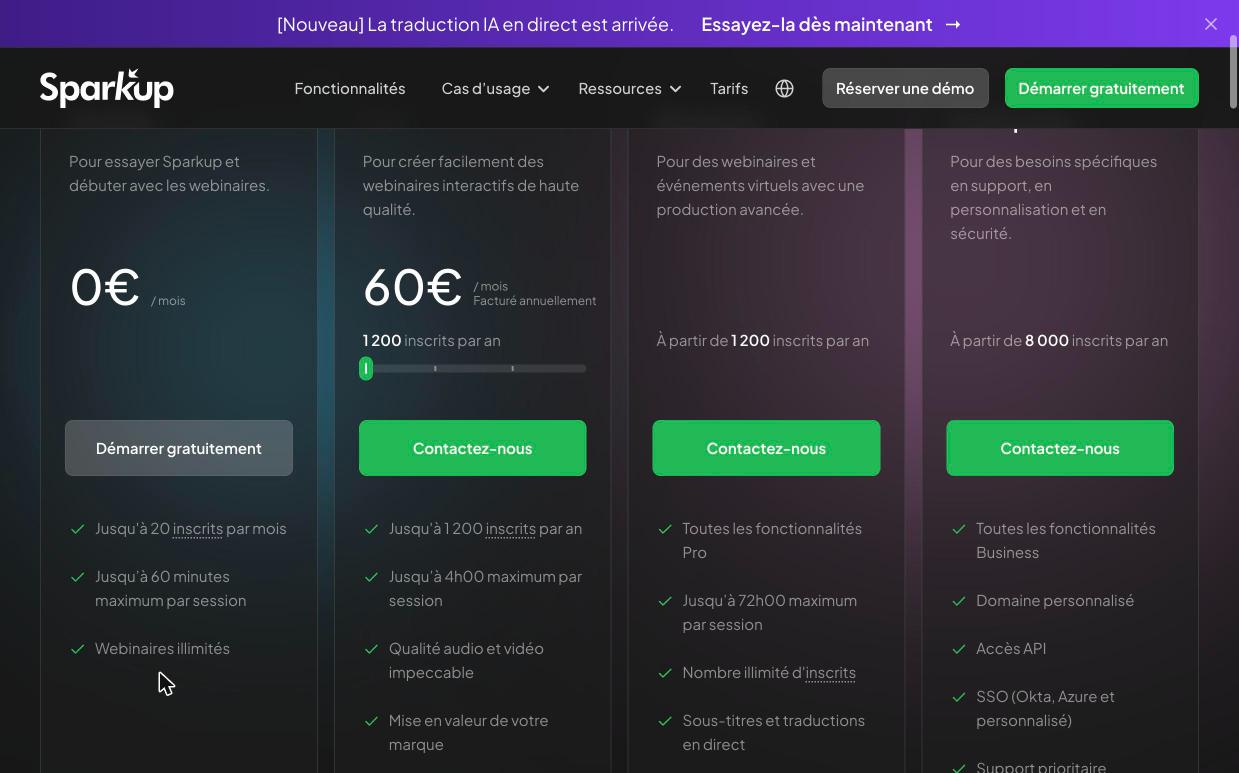 The Sparkup pricing grid as of October 15, 2026: Pro at €60 per month, billed annually, for 1,200 registrants.
| Plan | Price | What to remember |
|---|---|---|
| Free | €0 | 20 registrants per month, 20 participants, 60-minute sessions, 720p, Sparkup logo |
| Pro | €60 to €800 per month, billed annually | 1,200 to 12,000 registrants per year, 1,000 participants, 4-hour sessions, no Sparkup logo, support within 48 hours |
| Business | On quote, from 1,200 registrants per year | 5,000 participants, 72-hour sessions, simulated live, RTMP, API, translation and restreaming as options |
| Enterprise | On quote, from 8,000 registrants per year | 10,000 participants, custom domain, SSO included, dedicated account manager, SLA |
The Pro plan comes in four tiers: €60 per month for 1,200 registrants per year, €200 for 3,000, €400 for 6,000 and €800 for 12,000. The grid does not say whether these amounts exclude VAT, a point to confirm when you get the quote.
The model deserves a closer look, because it works in favor of teams. Sparkup bills by registrants, not by organizers: user accounts and webinars are unlimited on every plan. The whole comms team can host without paying for one more seat. And if an event takes off, Sparkup does not block registrations: the Pro plan moves up a tier, and the Business and Enterprise plans add registrant packs.
For reference, the first Pro tier comes to €720 per year, while Livestorm starts at €105 per month. My buying advice: the free plan to validate the format on a team meeting, Pro for an SMB that runs one webinar a month in front of a few hundred people, Business as soon as you need translation, simulated live or more than 1,000 concurrent viewers. Enterprise targets town halls at large groups, with SSO and an SLA.
What users say
Public reviews of Sparkup are excellent but rare: 5/5 on G2 with three reviews, 5.0 on Capterra with two reviews.
That is too few to draw a trend, and I'd rather say so. On Sparkup's G2 page, users praise the polls, quizzes and live Q&A, as well as smooth video even in front of a large audience. The only complaint I found is about price, judged high for a very small company. On Capterra, the two older reviews praise the richness of the interaction features and regret the lack of integrations with collaboration tools.
The strongest proof is elsewhere: in the references. Sparkup claims more than 600 client companies, including an eloquent French list: Saint-Gobain, Decathlon, SNCF Voyageurs, Matmut, Crédit Mutuel, L'Oréal, CGI. The published testimonials point the same way. At AÉSIO Mutuelle, the platform makes internal communication more personal. At RATP, it sets the rhythm of speaking slots and involves every participant in the discussion. At Coca-Cola, training days went from endured PowerPoint presentations to active participation.
This profile explains the rest: Sparkup sells mostly direct to large accounts, which rarely leave a review on G2. The low review count reflects that sales model, not a weakness in the product.
Join the teams at Saint-Gobain, Decathlon and SNCF Voyageurs
The free plan is enough to judge the effect on your audience.
Sparkup vs. its alternatives
Sparkup wins on interactivity and internal events, Livestorm on marketing integration, Zoom and Teams on everyday meetings.
| Tool | Best for | Key difference |
|---|---|---|
| Sparkup | All-hands, training, highly interactive webinars | Virtual audience, interactions on the video, live translation |
| Livestorm | Marketing webinars and lead generation | Native CRM connectors, from €105 per month |
| WebinarGeek | European webinars with clear plans | From €49 per month, no permanent free plan |
| WebinarJam | High-attendance sales webinars | Built for selling during the session, more dated interface |
| EverWebinar | Always-on automated webinars | Scheduled replay of a recorded session |
| Zoom | Meetings and simple webinars | Mainstream video calls, more basic interactions |
| Microsoft Teams | Companies already on Microsoft 365 | Included in the suite, little branding |
| StreamYard | Creator lives on social networks | Broadcast studio, no audience management |
For a communications department running all-hands, town halls or hybrid events, Sparkup is the most convincing choice on this list, and for a training department too. For a marketing team whose only KPI is the number of leads pushed into HubSpot, Livestorm stays simpler to connect.
Sparkup does not necessarily replace Teams or Zoom, either: the Business plan takes their stream over RTMP and adds the virtual audience, polls and translation on top. You keep the meeting tool everyone knows and dress up the big moments.
How to get started with Sparkup
Getting started with Sparkup takes five steps, from the free access request to the first live measured in analytics.
- Request a free account on Sparkup's trial page, and the team contacts you to set it up.
- Brand the event: logo, colors, registration page, confirmation and reminder emails.
- Prepare the interactions ahead of time: an opening poll, a quiz in the middle, a word cloud to close.
- Rehearse in the backstage with the speakers, dedicated chat included, before opening the doors.
- After the live, grab the automatically assembled replay and read the retention and poll curves.
My advice: plan one interaction about every ten minutes, and check it in the analytics. If the retention curve drops at a specific moment, that is where a poll or a question to the audience was missing.
The live is only the middle of the journey. Send the replay to absent registrants with an emailing tool like Brevo (the options are compared in my ranking of email marketing tools), and end a sales webinar on a Calendly link to book meetings. The rest of the toolbox is in my marketing agency tool stack.
My verdict on Sparkup
Sparkup earns 8/10: it is one of the most polished webinar tools for getting an audience to participate, especially internally.
Its strength comes down to one idea applied all the way: the audience is not a counter, it is on screen, it votes, it comes on stage. Add live translation, hosting in France and SSO, and you get a tool made for all-hands at international groups, training and hybrid events.
A marketing team that lives in its CRM will miss a native connector. For everyone else, the math is quick: unlimited accounts and webinars, billing by registrants rather than by seat, first tier at €720 per year. A single town hall that the whole company follows, instead of enduring, pays for the subscription.
Launch your first interactive live
Free plan, unlimited webinars, no commitment.
Key takeaways
- Sparkup is a French platform for webinars and corporate live events, centered on audience participation.
- Strengths: interactions displayed on the video, virtual audience, live translation, data hosted in France.
- Pricing: free up to 20 participants, Pro from €60 to €800 per month depending on registrants, Business and Enterprise on quote.
- Limits: no native CRM connector, top-tier plans on quote, few public reviews.
- Best for internal communications, training and hybrid events. For lead generation tied to a CRM, also look at Livestorm.

